Manipulating http traffic with mitmproxy
Intercepting and rewriting HTTP traffic with mitmproxy, including a script that turns every image into a kitten.
Mitmproxy is a nifty little tool that lets us intercept and manipulate http (and https) traffic on the fly. It’s a man-in-the-middle proxy with both a commandline interface and a web interface to inspect, record and manipulate the http traffic. I have been playing with it this evening and I’ll try to share whatever I have found out till now.
So let’s install mitmproxy and have some fun. Installing mitmproxy was straight forward:
$ pip install mitmproxyNow we have to generate the dummy ssl certificates by running mitmproxy for the first time. The generated certificates should be in ~/.mitmproxy.
Now we have to add the certificate to our browser. Here is the official guide for Firefox. Also install this add-on for quick proxy switching in the future. Use 0.0.0.0:8080 as your proxy address and port and we are all set.
If we run mitmproxy now and try to visit google.com in our browser we can see the request being logged in the console. Here’s what mine looks like. 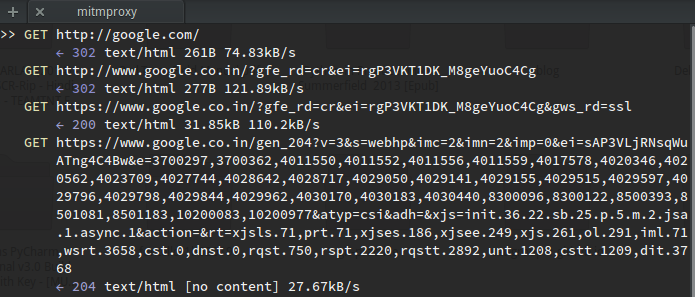 We can alaso use
mitmdump to record the requests and responses to a file and later replay them using mitmproxy.
Now the coolest thing (that I know of) is that mitmproxy lets you manipulate traffic on the fly by executing inline scripts. Some examples of inline scripts are included in the repo. Let’s execute this example which rotates all png images by 180°. We can use this script by running:
$ mitmproxy --script /path/to/upsidedownternet.pyInspired by this script I wrote a script to replace all images with the picture of a cute kitten. (Yes, I’m helping the kitten army take over the Internet ;))
Here’s a screenshot of my Twitter timeline with the script running. 
Here’s the source of my script.
# cat_apocalypse.py

import cStringIO
from libmproxy.protocol.http import decoded


def response(context, flow):
    if flow.response.headers.get_first("content-type", "").startswith("image"):
    with decoded(flow.response):
        try:
            img = cStringIO.StringIO(open('kitty.png', 'rb').read())
            flow.response.content = img.getvalue()
            flow.response.headers["content-type"] = ["image/png"]
        except:
            pass
Now running mitmproxy --script cat_apocalypse.py fills our http traffic with pictures of our cute little friend.
Thanks for reading.
Thanks for taking time to read this post. Hope you found it interesting. Do check out mitmproxy. I’ll also write a post on fiddling with mobile app traffic with mitmproxy soon. Please check it out if you liked this post.